Keeping a white mechanical keyboard clean starts with powering it down, clearing loose dust and crumbs, and wiping surfaces with a barely damp cloth instead of spraying liquid directly onto the board.

Skip stronger chemicals until you know how your exact keycap material and case respond to cleaning. From there, the right method depends on whether your keycaps are ABS or PBT and whether they can be safely removed.
Start with a low-risk routine for a white mechanical keyboard
Before touching any cleaner, disconnect the keyboard and remove loose debris first. This single habit prevents most of the liquid-related mistakes that damage a white finish.
Use a simple decision branch. If you don't know your keycap material or your caps don't come off, clean the assembled surface only, with dry tools and a lightly damp cloth applied to the cloth, never sprayed onto the board. If you've confirmed your keycaps are removable and the manufacturer's instructions allow water-based cleaning, you can wash detached caps separately for a deeper clean.
If a key still looks shiny or discolored after one gentle cleaning pass, don't reach for a stronger product right away. Persistent shine after mild cleaning usually means the plastic surface has worn down, not that dirt is still there. Cleaning removes oil and dust efficiently, but it can't rebuild a textured surface that has gone smooth from years of typing. Treat that outcome as a material question, not a cleaning-technique failure, and revisit your options in the next section before you try anything harsher.
ABS vs. PBT keycap care
PBT keycaps hold up better against the greasy-looking shine that heavy typing produces, while ABS keycaps feel smoother out of the box but wear visibly sooner. Neither material is immune to discoloration, so the choice comes down to which trade-off matters more to you.
| Factor | ABS | PBT |
|---|---|---|
| Surface feel | Smooth, slightly softer | Slightly textured, firmer |
| Wear appearance | Tends to develop a glossy, sticky-looking shine with use | Resists that greasy look longer |
| Maintenance implication | Cleaning removes oil but won't restore worn gloss | Fewer touch-up cleanings needed for shine specifically |
| UV qualification | No material is proven immune; limit direct sun for either | Generally favorable durability, but not guaranteed UV-proof |
| Best-fit reader | Wants a smoother feel and accepts more visible wear over time | Wants lower-maintenance appearance on a heavily used board |
If long-term resistance to that greasy-looking wear matters most, PBT is the stronger choice for a white build. If a smoother, finer surface feel matters more to you than avoiding visible shine down the road, ABS remains a reasonable pick, as long as you accept that heavily used keys will show wear sooner.

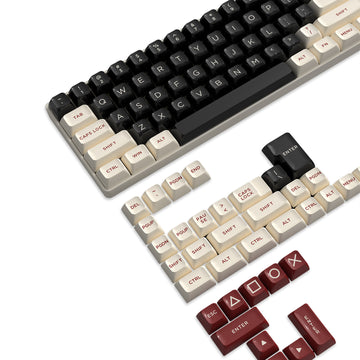
When ABS keycaps have worn past what cleaning can fix, replacing them is usually more practical than continuing to clean a permanently glossy surface. Our 144-key PBT keycap set uses double-shot injection-molded PBT in a Cherry profile with a matte texture, and it's built for wear and oil resistance, so it fits keyboards that use standard MX-style switches across 61 to 104-key layouts. Check your own board's layout and switch type before ordering a replacement set, since fit depends on those specifics rather than color alone.
Cleaning tools and step-by-step cleaning
A short tool list and a fixed order keep moisture away from the switches while you clean. Gather a soft microfiber cloth or swab, a can of compressed air or a low-suction vacuum attachment, and a keycap puller if your caps are removable.
- Power off or disconnect the keyboard before starting any cleaning step.
- If you plan to remove keycaps, photograph the layout first so you can reinstall every cap correctly.
- Clear loose debris between the keys using compressed air or a vacuum on low suction, working in short bursts rather than one continuous pass.
- If your keycaps are confirmed removable and your care instructions allow it, use a keycap puller to lift caps evenly and set them aside in the order you photographed.
- Wipe the assembled board with a cloth or swab that's damp, not dripping, and never spray liquid directly onto the keyboard.
- Wash detached keycaps separately only when the manufacturer's instructions permit water-based cleaning, and rinse them in plain water rather than soaking them in cleaning agents.
- Let every removed cap dry completely before reinstalling; residual moisture trapped under a cap can cause problems later.
- Reinstall each keycap by aligning it over its stem and pressing straight down until it seats, then check the layout against your photo before you start typing again.
This sequence works whether you're doing a quick weekly dust-off or a deeper seasonal clean; the branch at step 4 is what changes based on your keycap material and manufacturer guidance.
Preventing UV yellowing and case staining
Keeping a white keyboard out of prolonged direct sunlight is the single most useful prevention habit, because it's a placement decision you control every day, not a cleaning fix you apply after damage appears.
Reduce prolonged direct exposure
Move the keyboard away from a sunny window or other strong, constant light source when you can. Controlled testing on ABS specimens has shown that ongoing UV exposure can shift plastic color and reduce surface gloss, and while that testing doesn't cover every keycap formulation or finished case, it supports treating placement as real prevention rather than a minor style choice. Indirect light still carries some exposure, so this is a risk-reduction habit, not a guarantee against any color change over years of use.
Know when a stain is no longer a routine-cleaning problem
Ordinary dust, fingerprints, and light residue respond well to the mild cleaning routine described above. If a mark or yellow tint stays after that gentle pass, it may reflect a material or coating change rather than surface dirt you can wipe away. At that point, stop experimenting with stronger cleaners, solvents, or abrasives on your own, and check your keyboard or keycap manufacturer's exact care instructions before trying anything beyond the approved mild method.
FAQs
Can I use rubbing alcohol on white keyboard keycaps?
There's no single yes that covers every keycap, legend, coating, and case combination. Use alcohol only if your keyboard or keycap maker's care instructions specifically approve it; otherwise stick with dry cleaning or a lightly damp cloth to avoid an unexpected reaction with the plastic or printed legends.
Will cleaning remove keycap shine?
Cleaning lifts away skin oil and surface dust effectively, but it doesn't reverse the gloss or texture change that comes from years of typing wear. If shine remains after a gentle cleaning pass, that's a sign of worn plastic, and replacing the affected keycaps is usually the more practical fix than repeated cleaning attempts.
How do I clean a keyboard if the keycaps cannot be removed?
Leave the caps in place and start with dry debris removal using compressed air or a low-suction vacuum. Wipe the assembled surface with a cloth or swab that's damp rather than wet, and never pour or spray liquid directly into the keyboard, since moisture that reaches the switches can cause problems that surface cleaning can't fix.
Is PBT immune to yellowing?
No, PBT doesn't come with a guarantee against UV-related color change. It generally has a favorable durability profile compared with ABS, but keeping any white keyboard away from prolonged direct sunlight remains the more reliable habit, regardless of which material your keycaps use.