Choosing a Hall Effect keyboard for work and competitive gaming is practical when its layout matches your desk, its linear feel stays comfortable through long typing sessions, and its software supports separate profiles. If any one of those breaks down, such as needing a dedicated number pad or tactile feedback, a conventional mechanical keyboard or two separate boards is the safer call. Checking your layout, switch preferences, and connection habits before buying ensures the board fits your daily workflow.
Which Setup Fits Your Workday and FPS Routine?
The choice usually comes down to three paths, and each one solves a different priority. Use the table below to find your starting point, then check the matching section for the details that confirm it.
| Setup | Choose this when | Main compromise |
|---|---|---|
| Hall Effect keyboard | Smooth linear typing is fine, the layout fits your desk, and you will tune actuation for FPS play | Requires setup time and a linear-only feel |
| Conventional mechanical keyboard | Tactile or clicky feedback, fixed behavior, or low effort matters more than rapid trigger | No adjustable actuation or rapid-trigger reset |
| Separate work and gaming boards | Your work layout or feel truly conflicts with a compact, sensitive gaming setup | Extra desk space, cost, and a device-switching step |
If you already know you need a number pad every day or you dislike linear switches, skip ahead to the layout and typing-feel checks. They will confirm whether your instinct is right.
Start with the Workday Layout, Not the Gaming Feature List
Your layout decision should start with how often you use a number pad, not with how compact a gaming board looks. Frequent spreadsheet work, accounting, or data entry makes a dedicated number pad a real daily requirement rather than an optional extra.
If you rarely touch a number pad, a compact board frees up desk space for mouse movement, which helps both FPS aim and everyday multitasking. But if navigation keys, a function row, or numeric entry are central to your job, a tenkeyless or full-size mechanical keyboard is often the more comfortable one-board choice. Our 75% layout guide covers how that middle-ground size balances desk space against key count if you are still weighing compact against full-size options.
Typing Feel Is the Go-or-No-Go Check for All-Day Work
A rapid-trigger keyboard can stay comfortable for sustained typing if you prefer a smooth linear feel and set a forgiving actuation point. When evaluating a Hall Effect keyboard for work, switch feel and your chosen sensitivity determine all-day comfort rather than the magnetic switch label alone.

Hall Effect sensing works by pairing switches with embedded magnets to sensors on the keyboard's circuit board, which is what makes adjustable actuation and reset behavior possible in the first place, according to RTINGS' explanation of Hall Effect sensing. Nearly all Hall Effect switches on the market today are linear, and setting actuation extremely low can make keys easier to trigger by accident. That second point matters more for work than for gaming, since accidental presses in a document or chat window are more disruptive than in a quick game round.
What to Notice During a Typing Test
Test the keyboard with the kind of typing you actually do at work rather than a quick tap on the desk. Write a real email, a short document, or a few lines of code at your intended actuation setting. Pay attention to whether presses feel controlled or whether you notice accidental double letters, finger fatigue, or a flat feel that bothers you after twenty minutes.
When Mechanical or Separate Boards Make More Sense
Choose a conventional mechanical keyboard when a tactile bump or an audible click is central to how you type accurately. Choose separate boards when your ideal work feel and your ideal gaming feel genuinely cannot share one switch type or one actuation setting.
Use Profiles to Separate Work Settings from FPS Settings
Keeping gaming sensitivity from bleeding into your workday comes down to a short profile routine rather than constant manual adjustment. Start by checking whether the model you are considering exposes actuation and rapid-trigger controls through a usable driver or web tool, since that access is what makes separate profiles possible at all.
Once you confirm that, build a calmer work profile that favors controlled, deliberate presses over the lowest actuation number the software allows. Build a second, faster profile only if you will actually use rapid trigger or adjustable actuation for FPS play. Before you rely on this setup daily, switch between the two profiles and type or play briefly to confirm the settings return reliably. Skipping that check is how buyers end up gaming on a work profile or typing on a hair-trigger setting without noticing.
Match Connectivity to Your Device-Switching Routine
Your connection choice should follow how you actually move between devices, not a general assumption that wireless beats wired or the reverse. If your keyboard stays at one desk and a cable is no issue, a wired connection is a dependable choice. If you genuinely switch between a work laptop, a desktop, or other devices, multi-mode connectivity earns its keep.
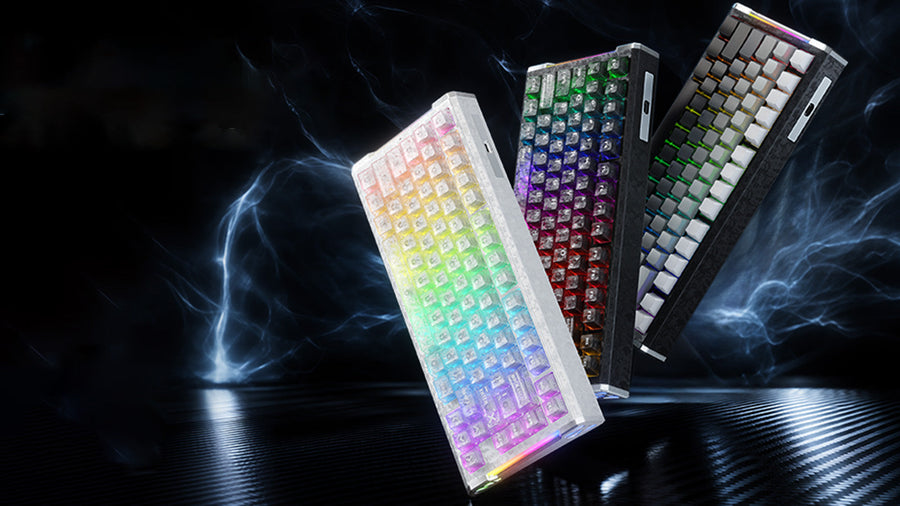
Our X65 Pro HE pairs a compact 67-key layout with USB-C, 2.4G wireless, and Bluetooth, which fits a shared desk where you switch between a work computer and a gaming PC without needing a dedicated number pad. Our R68 HE keeps the same compact footprint but connects only over wired USB-C, so it suits a single-desk setup better than one where you need to swap devices wirelessly throughout the day. Check the exact operating systems and pairing behavior you need before buying either one.
Use Rapid Trigger Where It Helps, Then Tame Sensitivity for Work
Adjustable sensitivity earns its place on a mixed-use keyboard when competitive FPS movement is a real priority for you rather than a general productivity upgrade. Reserve the faster behavior for gaming, dial in a calmer setting for work, and skip the feature entirely if you prefer not to manage two profiles.
What Rapid Trigger Changes in FPS Play
Rapid trigger lets a key reset as soon as it starts moving upward instead of waiting for a full release, which is relevant to the repeated movement inputs common in fast-paced shooters, per RTINGS' rapid-trigger testing. That same testing found only small release-latency differences among modern rapid-trigger boards, so layout, typing feel, and software fit should still carry more weight in your purchase decision than chasing the fastest number on a spec sheet.
Why Work Should Use the Calmer Setting
Setting actuation extremely low can make keys easier to trigger accidentally, which is a fine trade during a game but an annoyance while typing a report. A work profile should favor deliberate, predictable presses over the most sensitive setting the keyboard offers.

Choosing a Hall Effect keyboard for work makes sense when you value adjustable FPS sensitivity and enjoy a smooth linear switch. Before making your final choice, confirm your desk layout requirements, set up a calmer profile for everyday typing, and test your switch preference during a normal workday.
FAQs
Can you type comfortably on a rapid-trigger keyboard?
Yes, conditionally: comfort depends on whether you like a smooth linear keypress and whether you set actuation to a more forgiving point rather than the lowest one available. Before you commit to typing on it daily, write a realistic paragraph or work sample at your intended setting. If you notice accidental presses or miss a tactile bump, that is your signal to choose a conventional mechanical keyboard or a separate work board instead.
Do Hall Effect keyboards offer tactile or clicky switches?
Nearly all current Hall Effect keyboards use linear magnetic switches rather than tactile or clicky mechanisms. If you rely on a physical bump or click for typing rhythm and accuracy, a conventional mechanical keyboard remains the better choice for everyday work.
How do you prevent accidental keypresses while typing?
Create a dedicated work profile that uses a higher, more forgiving actuation depth rather than ultra-sensitive gaming settings. Reserving rapid trigger and low actuation thresholds exclusively for FPS play prevents resting fingers from causing unintended keystrokes during office tasks.