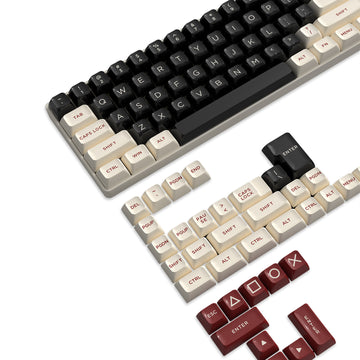
A 98-key keyboard is the better pick when you need a dedicated numpad but want to claw back some desk width, while a full-size 104/108-key full size gaming keyboard still wins if you value conventional spacing and zero adjustment period. The gap between the two comes down to how tightly each case packs the arrow cluster, numpad, and function row rather than whether the numpad exists at all. Before buying either style, check the exact product diagram and measurements instead of trusting the layout name.
98-Key vs Full-Size: Which Layout Fits Your Desk?
Pick a 98-key layout when you want numpad access on a narrower desk, and pick full-size when standard spacing without any relearning matters more. Both categories can include a complete number pad; they differ in how tightly the surrounding keys are packed.
What a 98-Key Layout Retains
The main reason to consider a 98-key board is that it keeps dedicated numpad functionality, unlike a tenkeyless or 75% layout that drops the pad entirely. That said, "98-key" is a category label, not a guaranteed key map. Some models compress the navigation cluster, some shrink the function row, and others shift keys into secondary functions. Treat the number as a starting point and confirm the actual layout before assuming it matches a full-size board key for key. For scenario-based comparisons across layout sizes, our keyboard layout scenarios breakdown walks through coding, school, and FPS use cases side by side.
Where the Compression Happens
Compression typically shows up around the arrow keys, navigation cluster, and the gap between the main key block and the numpad. A 96%-style layout commonly tightens or removes that buffer zone to shrink the case width, while a traditional full-size 104/108-key board keeps that spacing generous and separated. This doesn't mean full-size keys are physically bigger; it means the empty space between key groups is larger. That extra space is what most full-size users rely on for muscle memory when reaching for Home, End, or Page Up without looking down.

| Feature | 98-Key Layout | Full-Size 104/108-Key |
|---|---|---|
| Numpad | Retained | Retained |
| Arrow/nav cluster | Often compressed or shared | Standard spacing |
| Function row | Sometimes condensed | Full height, standard spacing |
| Horizontal footprint | Narrower, but varies by model | Widest of the two |
| Transition effort | Some relearning for the compressed cluster | Minimal if you're already used to it |
Desk Footprint, Key Spacing, and Mouse Clearance
Measure your desk width and mouse-arm swing before comparing spec sheets; those numbers matter more than the layout name. A 98-key board can free up horizontal room, but how much depends on the case design, not the percentage in the marketing copy.
| Check | What 98-Key May Change | What to Verify |
|---|---|---|
| Overall width | Often narrower than full-size | Manufacturer's listed width and depth |
| Key-center spacing | Usually close to full-size | Measured spacing against your hand size |
| Mouse clearance | Improves over full-size, less than tenkeyless | Actual room with your mouse and desk setup |
| Navigation cluster | May be condensed or share keys | Layout diagram before you buy |
General ergonomic guidance from OSHA recommends keyboard placement and spacing with horizontal key-center spacing around 0.71 to 0.75 inches and vertical spacing around 0.71 to 0.82 inches, alongside keeping the board directly in front of you with relaxed shoulders and straight wrists. That's a general reference point, not a certification for any specific 98-key model. On the mouse side, OSHA also notes that a keyboard without a numpad leaves more room for mouse placement next to the keyboard. That's the honest tradeoff: a 98-key board can reclaim some width through compression, but it won't match the mouse clearance of a tenkeyless board, because it still carries the full numpad. If width and aim matter as much as numpad access, our guide on keyboard width and aim goes deeper on how form factor changes shoulder position and reach.
Which Layout Works Best for Gaming, Spreadsheets, and Office Work?
Your daily tasks decide the layout more than any spec sheet does. Frequent numpad use and limited desk width pull in opposite directions, so match the layout to whichever pressure is stronger for you.
Choose 98-Key When Desk Width Is the Constraint
- Gaming desks with tight mouse room: you keep numpad shortcuts while reclaiming some width compared with a full-size board, though you still won't get tenkeyless-level clearance.
- Mixed office and gaming setups: one board handles browsing, documents, and games without swapping layouts, as long as you can accept a slightly condensed cluster.
Choose Full-Size When Familiarity Is the Constraint
- Spreadsheet and data-entry work: conventional numpad placement and no relearning curve outweigh a few extra inches of desk width, especially if you rely on numeric shortcuts all day.
- Desks with adequate width and low tolerance for a compressed layout: standard spacing avoids mis-hits during the adjustment period that a condensed cluster can require.
How to Verify a Specific 98-Key Keyboard Before Buying
A layout name doesn't guarantee an exact width, depth, or retained-key map, so confirm the specifics before checkout. Product dimensions and key counts vary even within boards that share the same category label.
- Confirm the actual key count listed in the product specifications rather than relying on a number in the name alone.
- Open the full layout diagram and check that the numpad, arrow keys, and function row match what you expect to use daily.
- Compare the listed width and depth against your measured desk space and current mouse position; a Cherry keyboard series datasheet lists models around 15.9 by 7.1 by 1.7 inches with key count noted as product-dependent, a useful reminder that one family name can cover several footprints.
- Check key-center spacing around the compressed cluster to avoid unexpected mis-hits once you start typing at speed.
- Read the specification page the way you'd review a keyboard spec page in full, so key count, dimensions, and connectivity come from the manufacturer rather than the marketing name.
- Verify any wireless mode, polling rate, or multi-device compatibility detail that matters for your specific setup before finalizing the order.
FAQs
Is a 98-key keyboard better than a full-size 104-key keyboard?
Neither layout is universally better; it depends on what you're solving for. A 98-key board is the better choice when you need dedicated numpad access but also want to reclaim some horizontal desk space and can accept a somewhat compressed navigation cluster. A full-size 104/108-key board is the better choice when conventional key spacing, familiar navigation placement, and no relearning period matter more than shaving off desk width. Either way, verify the exact layout diagram and dimensions of the specific model before you buy, since not every 98-key or full-size board is built the same.
Does a 98-key keyboard provide the same mouse clearance as a tenkeyless board?
No. While a 98-key layout is narrower than a traditional full-size keyboard, it still retains the numpad, so it will not free up as much mouse room as a tenkeyless or 60% board. It serves as a middle ground for users who want extra desk space without losing numeric keys.
Will switching to a 98-key keyboard affect typing muscle memory?
It can cause a short adjustment period, especially around the arrow keys, navigation cluster, and numpad boundary where key spacing is compressed. Most full-size keyboard users adapt quickly, but checking the specific layout diagram before purchasing helps prevent mis-hits on relocated keys.